
Fitbit and Apple Health sync on iPhone Duo
Updated 1 November 2026. Written by Minima Apps Ltd, the makers of Tandeo.
Tandeo copies your data both ways between Google Health, where your Fitbit data now lives, and Apple Health. It runs on iPhone Duo as the same app you use on iPhone and iPad.
Does Tandeo run on iPhone Duo?
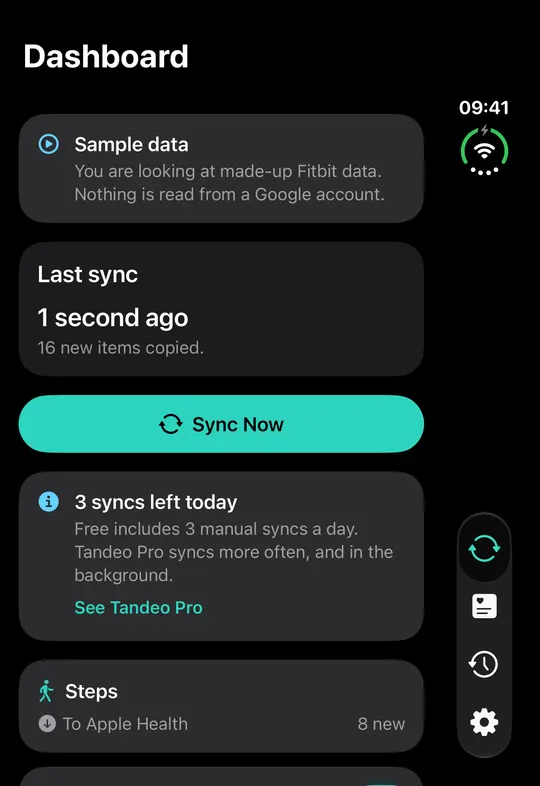
Yes. Tandeo is one app for iPhone, iPhone Duo and iPad, with no separate version to buy. On iPhone Duo the dashboard shows the Sync Now button, the last sync card and your chosen data types, with more room for each.
What you see on iPhone Duo
- Dashboard. A card shows when you last synced and how many new items were copied. Below it are the Sync Now button and a row for each data type, such as steps, with its direction and the number of new items.
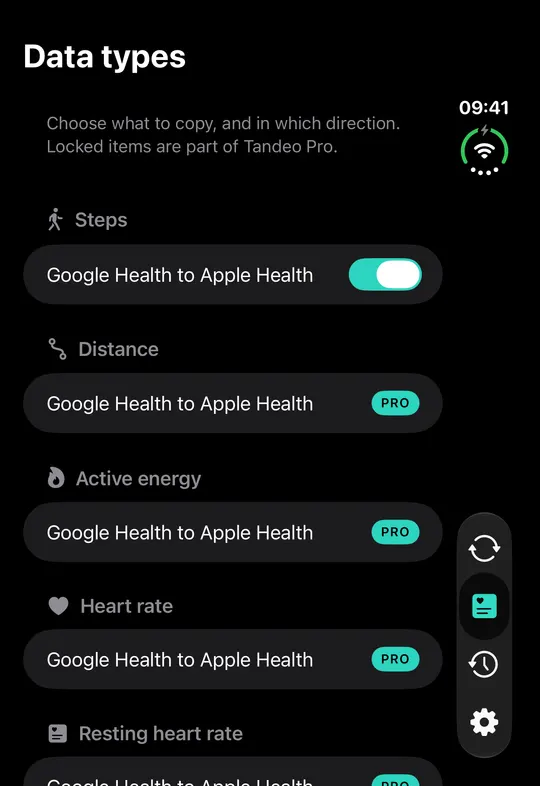
- Data types. Each data type has its own switch for each direction, so you choose exactly what is copied. The free plan covers any 3 items, and the rest are part of Tandeo Pro.
- Navigation. The tabs for Sync, Data types, History and Settings sit in a floating bar at the side of the screen, out of the way of your data.
Sync Fitbit and Google Health with Apple Health on iPhone Duo
- Open Tandeo and tap Connect Google Health. Sign in with the Google account that holds your Fitbit data.
- Allow access to Apple Health. A system sheet lets you choose exactly what Tandeo can add and read.
- Open Data types and switch on what you want to copy.
- Tap Sync Now on the dashboard.
Google Health to Apple Health copies steps, distance, active energy, resting energy, floors climbed, heart rate, resting heart rate, heart rate variability, blood oxygen, VO2 max, respiratory rate, body temperature, blood glucose, body mass index, lean body mass, sleep with stages, weight, body fat, height and workouts. The free plan covers any 3 items, where an item is one data type in one direction. Tandeo Pro unlocks every data type.
Apple Health to Google Health
The other direction sends weight, body fat, height, workouts and sleep from Apple Health to Google Health. Each one counts as one of your 3 free items, and Tandeo Pro unlocks them all. It is useful if a smart scale or your iPhone writes to Apple Health and you want that data next to your Fitbit data. For the full picture, read how to sync Apple Health data to Fitbit.
Privacy on iPhone Duo
There is no Tandeo account. The sync runs on your device, and nothing leaves your devices except the data you choose to sync. Read the privacy policy for details.
Tandeo is not affiliated with, endorsed by or sponsored by Apple, Google or Fitbit. iPhone Duo, Apple Health and iPhone are trademarks of Apple Inc. Google Health and Fitbit are trademarks of their respective owners.
Frequently asked questions
Does Tandeo work on iPhone Duo?
Yes. Tandeo runs on iPhone Duo, iPhone and iPad as one app, with no separate iPhone Duo version to buy.
Can I sync Fitbit with Apple Health on iPhone Duo?
Yes. Tandeo reads your Fitbit data from Google Health, where it now lives, and copies it into Apple Health. Connect your Google account, allow Apple Health access, choose your data types and tap Sync Now.
Can Apple Health data go to Google Health from an iPhone Duo?
Yes. Tandeo can send weight, body fat, height, workouts and sleep from Apple Health to Google Health. Each one counts as one of your 3 free items, and Tandeo Pro unlocks them all.
Is syncing on iPhone Duo free?
You can start free. The free plan covers any 3 items, where an item is one data type in one direction, with 3 manual syncs a day and 7 days of history. Tandeo Pro unlocks every data type, both directions, automatic sync and a year of history.